Web app • Landing page • Product design • 2023
Poggi inventory monitoring

Role
Product designer (freelance)
Team
Founders and developers
Timeline
3 weeks, 2023
Status
Presented on time, live at poggi.app
A fast redesign that turned a basic sensor-data web app into a polished product, ready to show retailers in three weeks.
The problem
Poggi is a small tech startup that puts sensors and cameras on supermarket shelves. The shelves count stock in real time, so retailers can see what’s running low and follow sales as they happen.
The team had built a working web app to show this to customers, but it still looked like an early prototype. A big reveal with potential clients was two to three weeks away, and the product needed to look as solid as the technology behind it.
The ask was clear: a polished, professional interface for the app and a simple landing page for the new service, both ready before the launch.
My role
I was the product designer on the redesign. I reviewed the live app, proposed the approach, designed the interface in Figma and worked side by side with the developers to hit the deadline. I also designed the landing page, which grew into Poggi’s marketing site.
Starting with people
Even on a short timeline, I wanted to understand the people behind the screens. I interviewed the founders and went through the documentation and materials they shared, to learn how store teams and head office use shelf data day to day.
Retail planning was familiar ground from my time at Relex. That helped me fill the gaps quickly: what a store manager checks first in the morning, why on-shelf availability matters so much, and how planograms decide what goes where.
Deciding together
With three weeks to go, the biggest decision was how to build the new interface, not just how it should look. Designing a system from scratch would have looked great, but it would have put the deadline at risk.
I proposed starting from a solid UI kit instead. It gave the developers ready-made components they could implement fast, and let me spend my time on the screens that mattered most in front of customers.
Making it tangible early
I designed directly in Figma and shared work in progress with the developers as I went, so they could start building while the design was still taking shape. Short check-ins with the founders kept everyone aligned on what had to be ready for the reveal.
Setting the details
The work focused on the views a retailer would see in a demo:
1. A dashboard with the big picture. Stock levels, alerts and sales trends across all stores, readable at a glance.

2. A view for every store. Retailers can open a single location and see how its shelves are doing right now.

3. Planograms that match the real shelf. Each shelf is shown the way it looks in the store, with sensor data on every product position.

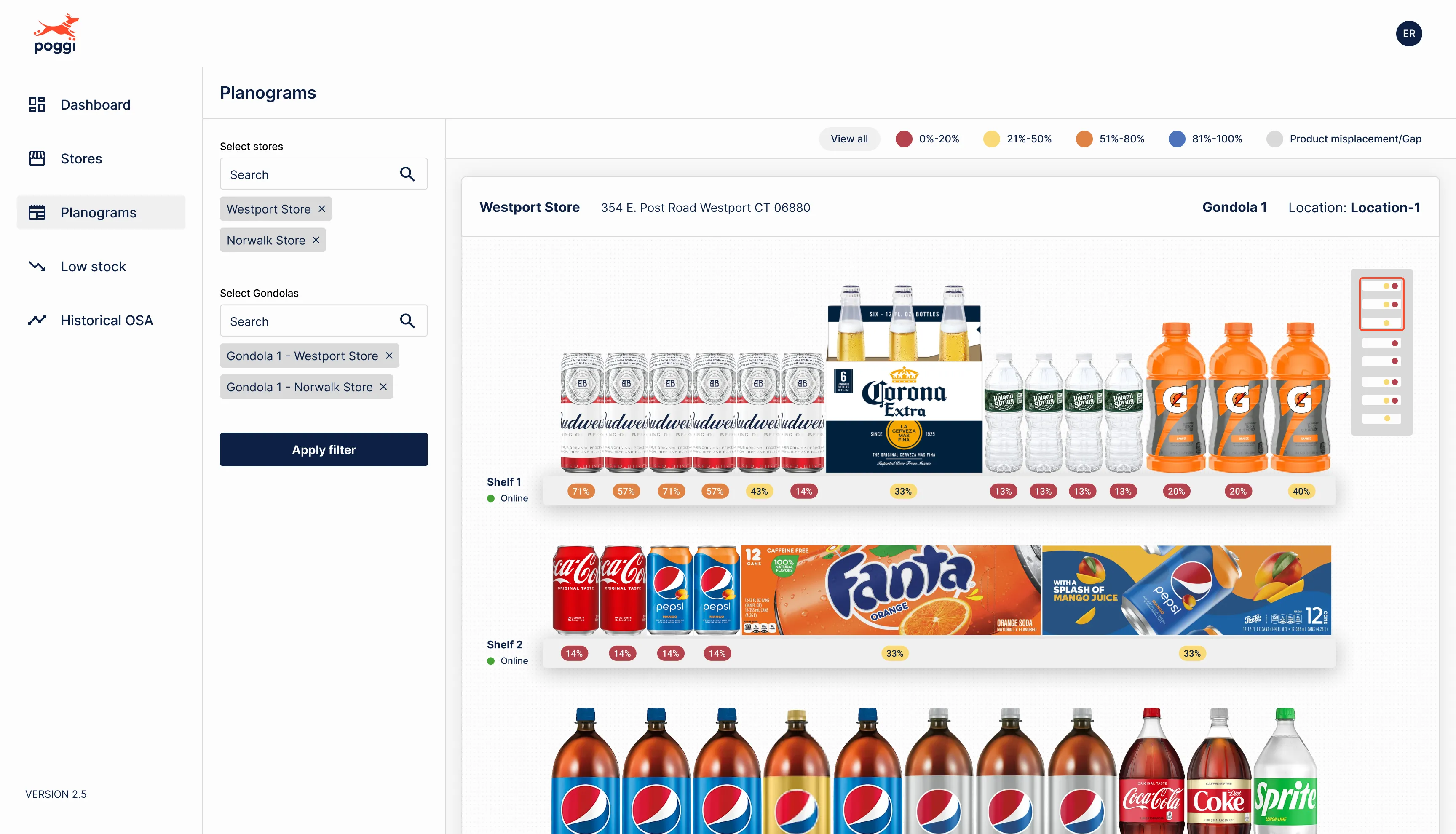
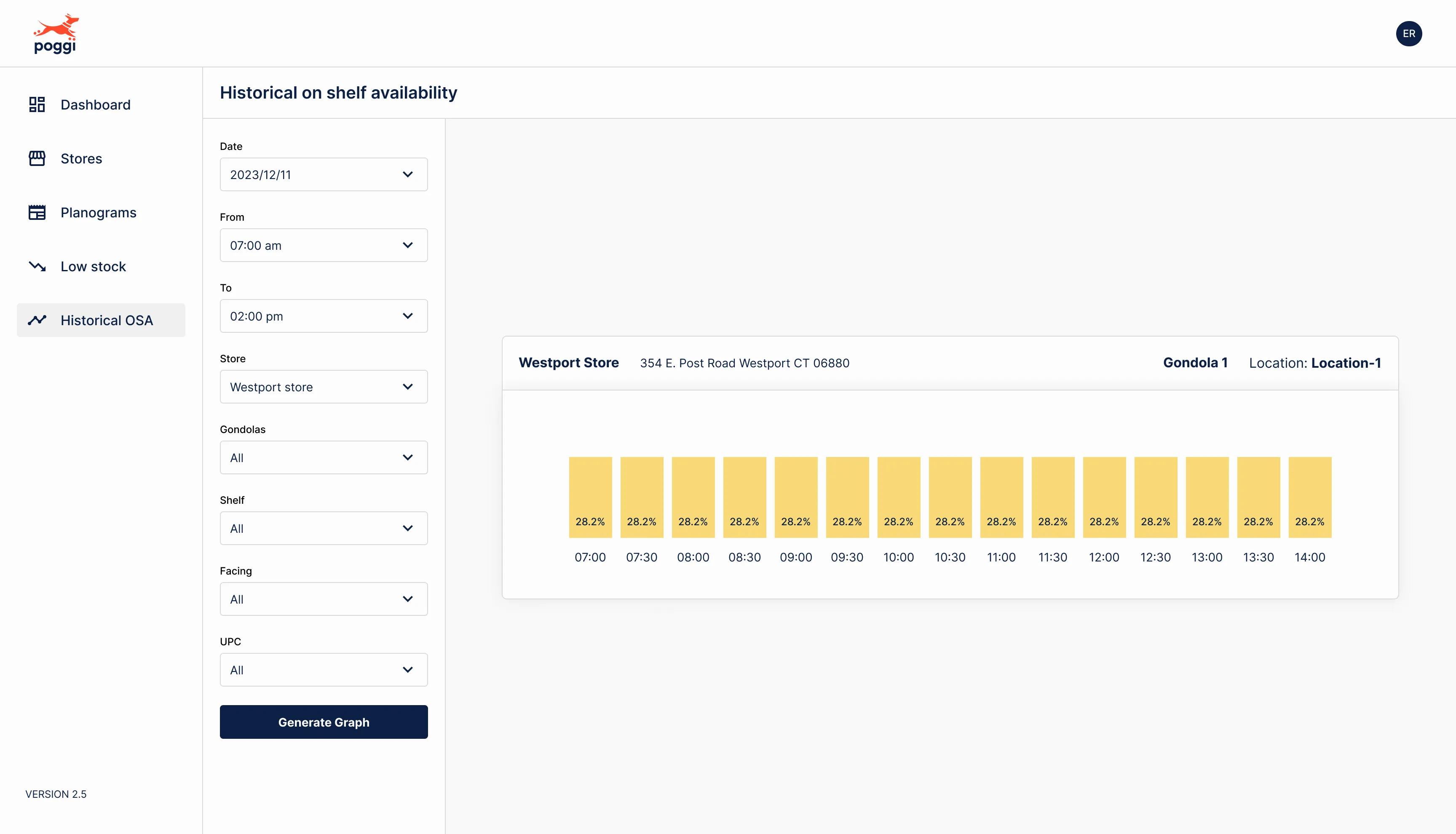
4. Low stock and on-shelf availability. A clear list of products running low, and a history of on-shelf availability (OSA) to spot patterns over time.

Alongside the app, I designed a simple landing page to introduce the new service. It became the marketing site at poggi.app.
The outcome
Ready on time. The redesigned app was presented to key stakeholders and potential clients as planned.
A product that looks the part. The new interface gave a small startup the polish of an established product.
Still running today. Poggi is still in business, and the marketing site I designed is live at poggi.app.
What I learned
Speed is a design decision too. A UI kit wasn’t the most glamorous choice, but it was the one that let the team ship. Knowing when to build on existing pieces, and where to spend real design effort, is part of the job.